India Flag Whatsapp Chat    India Flag Skype Chat    |    PARTNERS     SERVICES     CONTACT US     ABOUT US  
Features Screenshorts Reviews FAQs Order Now
FREE DOWNLOAD BUY NOW
Zimbra to PST Box


Supported Plans of Microsoft Office 365  

Zimbra to PST Box

Zimbra to Office 365 Converter for Smooth and Fast Migration


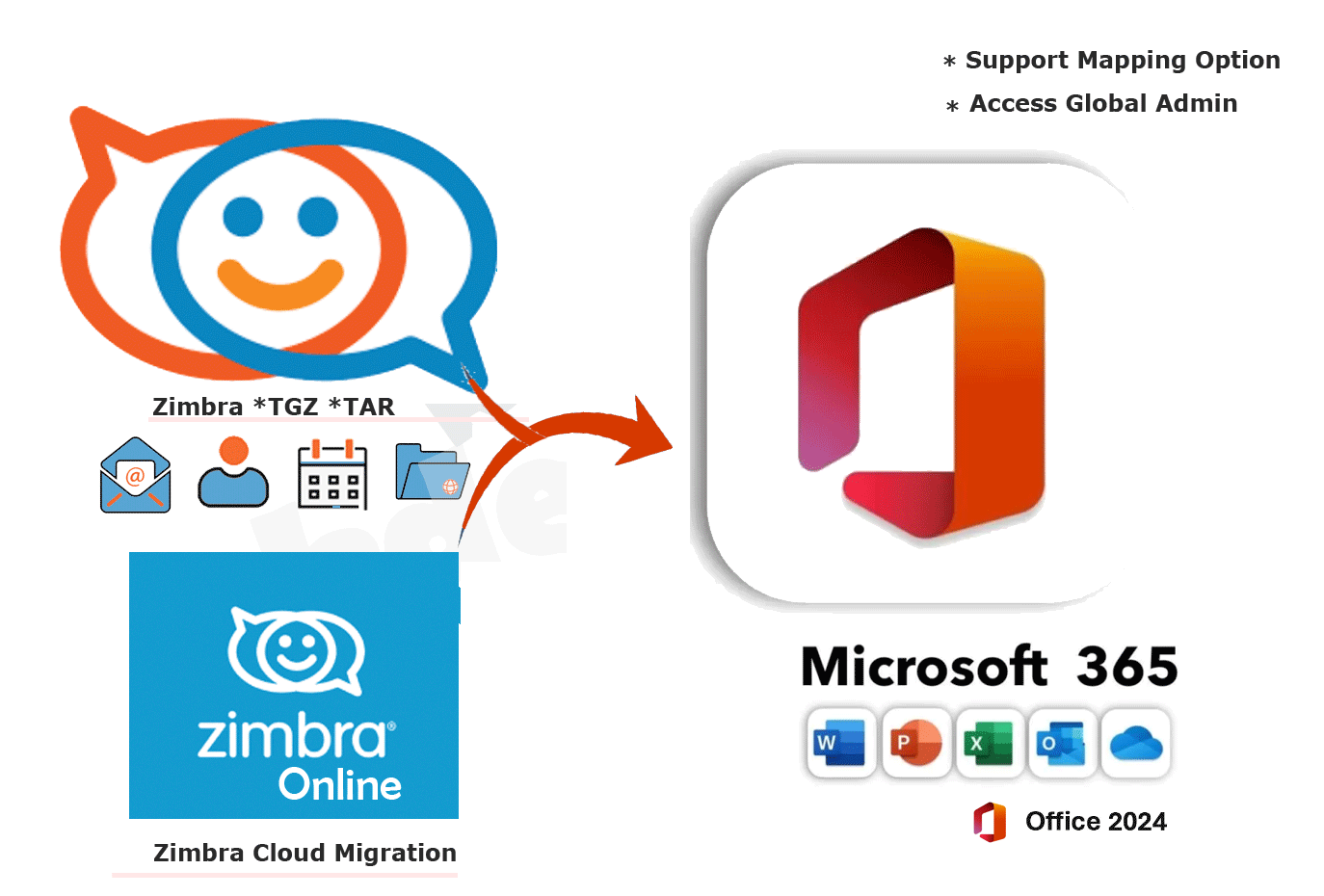
Effortless Zimbra to Office 365 Migration Tool can simplify the process by automating data transfer multiple data from Zimbra to Office 365 / Microsoft Office 365 / Exchange Server. Free Demo + 30 days money back guarantee.

Zimbra to Office 365 Migration tool is a an ideal solution Migrating from both Zimbra Desktop and Zimbra Collaboration Server (ZCS) to Office 365 (Microsoft Office 365) involves transferring multiple data like emails, contacts, calendars, briefcase and attachments. The Zimbra to Office 365 Converter tool process can be complex, depending on the size and structure of the data, as well as the specifics of your organization's environment.

Batch Zimbra to Office 365 Migration Tool can automate the migrate multiple number of users from Zimbra to Office 365 Cloud process. Such tools typically provide:

  • Bulk Migration Support: You can migrate large numbers of user accounts simultaneously, saving time and reducing the likelihood of migration delays.
  • Automated Migration: The migration tool automates the process of transferring emails, calendars, and contacts, reducing manual efforts and minimizing human error.
  • Data Integrity: The tool ensures that all data (emails, calendars, contacts, etc.) are preserved without any corruption.
  • Selective Migration: The tool allows you to migrate specific folders or data from Zimbra to Office 365.
  • User-Friendly Interface: The tool provides an easy-to-use interface that doesn’t require technical expertise, making the migration process simpler and more accessible.

Free Download     Purchase Now     How it Wokrs    

  • Free Live Demo - KDETools Zimbra to Office 365 Converter - Safe & Secure with Virus Free.
  • 100% Money Back Guarantee: 30 days money back fully guarantee.

Money Back Guarantee
30 Days
Money Back Guarantee
Satisfied Users
2 Million +
Satisfied Customers
Secured SSL Connection
100%
Safe & Secured
Free Lifetime Upgrades
Verified
by Microsoft MVPs

Zimbra to Office 365 Migration: A Comprehensive Guide


The Zimbra to Office 365 Migration software is presented as a helpful, all-in-one solution for handling number of Zimbra Mailbox files.

  • Upload Bulk Zimbra accounts:Transfer Online Multiple Zimbra Mailbox to Office 365 in Multiple Users at Once
  • Zimbra Webmail account: → Most advance option to Convert Zimbra Webmail emails directly into Office 365
  • Move Zimbra items: → Export All Emails, Calendars, Contacts, Briefcase from Zimbra to Office 365.
  • Move TGZ to O365: → Move Zimbra to Office 365 Archiving mailbox/ public folder.
  • Mapping Option: → Support Access Globad Admin accounts with Mapping Option.
  • Selective Items Conversion: → Migrates only the selected Folders / Items from Zimbra to Office 365.
  • Message Date Filtering: → Moves Zimbra files between Two Specific Date [MM/DD/YYYY].
  • Split Zimbra File: → Splits the resultant Zimbra file by Folder/Size in Outlook
  • Multiple Saving Formats → Save Zimbra in PST, EMLX, MSG, ICS, vCard, MBOX, HTML etc
  • Supported Plans: → O365 Enterprise, O365 Business Essentials, O365 Business Premium, many more...
  • File Restriction:No Users & File limitations to convert Unlimited Zimbra TGZ to Office 365
  • Compatible All Zimbra Version → Compatible with All Versions of Zimbra Desktop 7.3.1, 7.3.0, 7.2.8, 7.0.1, etc.
  • Support all Windows OS → Supports Microsoft Windows OS & Windows Server 2022, 2019, 2016, 2012 R2, 2008

line

Software Box

Why Migrate from Zimbra to Office 365?)


Migrating from Zimbra Mail to Office 365 is a smart move for organizations looking for enhanced collaboration, security, scalability, and ease of use. Office 365 offers a modern, cloud-based environment with strong integration with Microsoft’s productivity tools, making it a powerful choice for businesses of all sizes. Whether you're looking for better user experience, cost savings, or a future-proof solution, Office 365 can help streamline your operations.

A Zimbra to Office 365 Converter tool automates the process, ensuring that:.

  • Emails, Contacts, Calendars, and Tasks are transferred accurately
  • Folder structures and metadata are preserved
  • Zero data loss occurs during the migration process
  • Minimal downtime is achieved, ensuring business continuity
  • Complete migration is achieved in a fraction of the time it would take manually

line

Zimbra to Office 365 Migration - Pre-Migration Planning


Before starting the migration, it's essential to perform the following tasks:

Backup Your Zimbra Data: Ensure that all your data, including emails, contacts, calendars, and other relevant information, is backed up properly in case of any issues during the migration.

Plan the Migration Timeline: Determine when to perform the migration, taking into account the least disruptive times for your organization (e.g., weekends or off-peak hours)..

User Account Setup in Office 365: Set up Office 365 accounts for all users who will be migrating from Zimbra.

Enter the Office 365 credentials for the user(s) or administrator account to which the Zimbra data will be migrated.

Ensure that you have the necessary permissions in Office 365 to perform the migration for multiple users.

Zimbra to Office 365 Migration - Challenges


Large Data Volumes:: Migrating large volumes of data, especially with emails containing many attachments, can take time. It is essential to plan for the migration process to ensure minimal disruption..

Data Loss: There’s always a risk of data loss during the migration, especially if manual methods are used. Using reliable migration tools can mitigate this risk.

Complex Configurations::If your Zimbra environment has complex configurations (e.g., custom filters, user permissions), ensure that the migration tool you use supports these configurations.

Large Data Sets: If you're migrating a large volume of data, the migration process may take time. It’s important to ensure that the tools or methods you’re using can handle large mailboxes and folders.

line


Awarded by

CNET Editor's Choice

"KDETOOLS, a well known name now! Company created many trusted and superiorly working tools in the field of Data Recovery, Email Migration, Cloud Computing, etc."

CNET Editor's Choice

"KDETOOLS, a well known name now! Company created many trusted and superiorly working tools in the field of Data Recovery, Email Migration, Cloud Computing, etc."

pcmag.com

"KDETools is a reputed name in the Data Recovery and File Repair tools across the world. They have been serving for more than a decade and continue to develop innovative tools to satisfy their customers' requirements."

pcmag.com

"KDETools is a reputed name in the Data Recovery and File Repair tools across the world. They have been serving for more than a decade and continue to develop innovative tools to satisfy their customers' requirements."

Testimonials


Migrate Batch Zimbra Mailbox to Office 365 for On-premise & Cloud Hosted directly


The Batch Zimbra Converter tool has a 'Zimbra to Office 365 Migration Migration' feature that enables the user to Migrate multiple Zimbra Cloud Mailboxes to Office 365 / Exchange Server without losing even a single file. The efficient tool consists of a 'Batch Support' feature that enables the user to move TGZ files in bulk in one go. The software is integrated with an advanced feature that enables the user to convert multiple Zimbra files at once. The user can select from the below option
  • Download Zimbra to Office 365 Converter Tool on your Machine
  • Click on "Top" Menu to "Online Zimbra" Option for Webmail
  • Enter the Online Zimbra Login details in all the Fields
  • Successfully Access, click on Load/Preview Zimbra Mailbox
  • Click on "Convert Now" Button" to Start Migration

Software Box


Software Box

Migrate Zimbra to Office 365 by [Access Global Admin account]


The efficient Zimbra to Office 365 Converter to Migrates Multiple Zimbra TGZ files to Office 365 account after the user provides correct details such as password and admin user id. After submitting the correct details, the user can easily migrate Zimbra files to Office 365 account without any hassle. It is compulsory to fill the details and only then, the user can migrate Zimbra files to Office 365 account.

By using this advanced Mapping Option feature, the user improves the security of their files.

  • Install Zimbra to Office 365 Migration Tool on your Machine
  • Click on "Add" Option to Browse Multiiple Zimbra Mailbox
  • Click on "Office 365" button in top menu
  • Enter Required Office 365 details in all the Fields
  • Click on Connect to Server button and click on Convert now to Start Process

Transfer Zimbra Mailbox to Office 365 With Mapping option in Bulk Users


The Zimbra to Office 365 Migration software allows the user to transfer their Zimbra files to their Exchange Office 365 account. After downloading, installing and running the software, the user needs to fill relevant information of their accounts such as Domain Name, Exchange Version, password, and username. Once the user signs in their account, then they can directly import their TGZ files to their respective Live Exchange Office 365 account. .

The user can rest assured as the software ensures 100 % positive result in migrating files from Zimbra to Live Exchange Server account without risking the security of the data.

  • Download Zimbra to Office 365 Converter Tool on your Machine
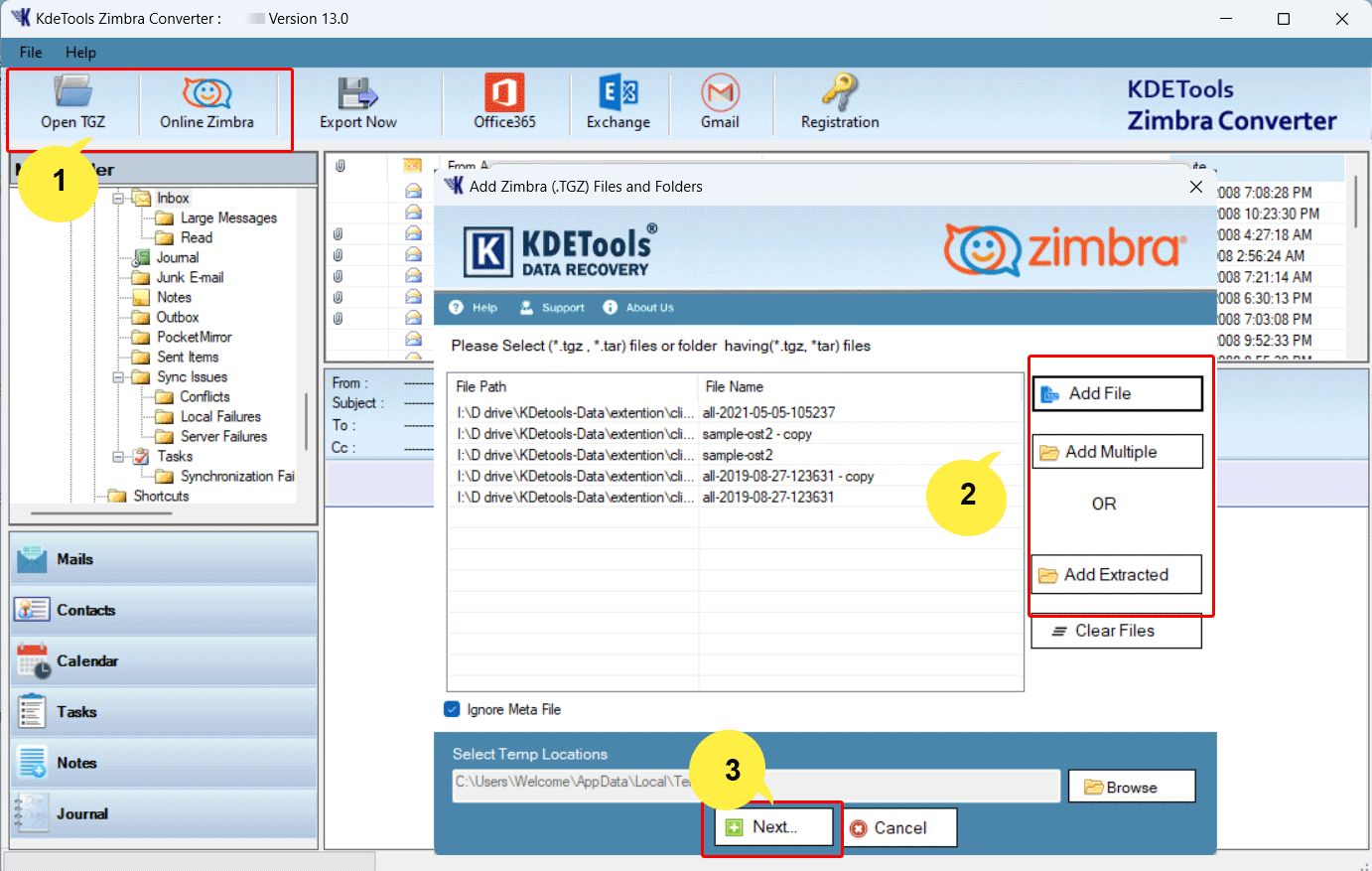
  • Click on "Open" button to Browse "Multiple" or "Extracted" accounts
  • Auto Scan Zimbra Mailbox and Click to "[Office 365]" button
  • Enter the Office 365 details in all the Fields
  • Now, click on "Convert Now" Button" to Start Conversion

Software Box


Advance Key Features – Zimbra to Office 365 Converter

Software Box

Direct Zimbra to Office 365 Migration

Direct Zimbra to Office 365 Migration

The tool directly migrates all types of data, including emails, calendars, contacts, and other mailbox components, from Zimbra to Office 365 without needing an intermediate file format (like PST). This means the process is faster and reduces the risk of data loss..

Bulk Migration Support

Bulk Migration Support

The Zimbra to Office 365 Converter allows bulk migration, meaning you can migrate data for multiple users simultaneously. This is particularly useful for businesses or organizations with a large number of employees.

Complete Data Migration

Complete Data Migration

A top-tier converter tool ensures that all critical data—emails, calendars, contacts, tasks, and attachments—are seamlessly migrated from Zimbra to Office 365. It handles both Zimbra Open Source and Zimbra Network Edition without any hassles.

Multiple Zimbra Account Migration

Multiple Account Migration

Most Zimbra to Office 365 converters offer batch processing, allowing businesses to migrate multiple Zimbra accounts to Office 365 simultaneously. This significantly reduces the time and effort needed for large-scale migrations.

Supports Zimbra Email, Calendars, Contacts, Tasks

Supports Zimbra Email, Calendars, Contacts, Tasks

The converter tool supports the migration of emails, calendar events, contacts, and tasks to Office 365. This is crucial for users who rely on multiple features within Zimbra for communication and collaboration.

Selective Data Migration

Selective Data Migration

Selective Data Migration The tool allows you to selectively migrate specific data from Zimbra to Office 365. This can be particularly useful if you only need to migrate certain folders, specific dates of emails, or selective contacts and calendar events..

Preserves Folder Hierarchy

Preserves Folder Hierarchy

One of the critical aspects of a successful migration is preserving the folder structure. The converter tool ensures that the folder hierarchy from Zimbra is replicated in Office 365, so users can easily navigate and find their emails in the new environment.

Maintains Metadata Integrity

Maintains Metadata Integrity

The tool ensures that all metadata, such as email attachments, dates, sender/receiver information, and calendar events, are preserved during the migration process. This ensures that no important data is lost in the transfer..

Incremental Migration

Incremental Migration

If your Zimbra server is still active during the migration process, the converter tool can perform an incremental migration. This means you can migrate the most recent data without overwriting or duplicating data already transferred..

User-Friendly Interface

User-Friendly Interface

Designed with ease of use in mind, the Zimbra to Office 365 Converter comes with an intuitive interface that doesn't require advanced technical skills to operate. This allows both IT admins and non-technical users to perform the migration without hassle..

Convert Zimbra to Various File Format

Convert Zimbra to Various File Format

The Zimbra to Office 365 converter converts Zimbra files to multiple file formats such as Outlook, Gmail, Exchange Server, PDF, HTML, NSF, MSG, EML, EMLX, PST, and etc. The user can choose the file type from the available options and save the files in the desired file type at the location on their system.

Transfer Online Zimbra Mailbox to Office 365

Transfer Online Zimbra Mailbox to Office 365

The Zimbra to Office 365 Migration software is developed with the latest algorithms that cater to the diverse needs of the customers. The tool is well-equipped with advanced features that allow the user to export Zimbra files to Office 365 format by making a single or multiple Office 365 files.

Convert Zimbra to Office 365 On-premise

Convert Zimbra to Office 365 On-premise,

The Zimbra to Office 365 converter transfers Zimbra TGZ files to Office 365 account. The user needs to download, install and run Zimbra converter on their computer. After launching the tool, the user can import the TGZ files to their respective Office 365 account by filling the correct credentials of their account such as username, password, and email address. .

Migrate Zimbra Calendars to Office 365

Migrate Zimbra Calendars to Office 365

Zimbra Calendar to Office 365 converter is developed with advanced features that enable the user to transfer Zimbra Calendar meeting details to Office 365 account. By using the converter, the user can transfer the Zimbra calendar to Office 365 account safely without damaging or losing even a single file. .

Exports Zimbra Contacts to Office 365

Exports Zimbra Contacts to Office 365

The Zimbra Contacts to Office 365 converter has an array of features and one such feature is that the tool transfers Zimbra contacts to Office 365 account safely. The user can easily migrate Zimbra contacts to Office 365 account by launching the tool on their operating system..

Advance Message Filtering to Search specific Zimbra

Migrate Zimbra to MBOX [Thunderbird | Apple for MAC]

The Zimbra to Office 365 Migrator consists of the ‘Message Filtering’ feature that facilitates the users to migrate Zimbra files to Office 365 between certain specific dates. The users can migrate Zimbra files between two dates by clicking on ‘From’ and ‘To’ option. By using this advanced feature, the users can migrate Zimbra files to Office 365 account between two certain dates..

Error-Free and Reliable Process

Error-Free and Reliable Process

The tool is designed to handle large volumes of data without compromising on speed or accuracy. It runs robustly, minimizing the risk of errors and ensuring a smooth migration experience.

No Technical Expertise Required

No Technical Expertise Required

You don’t need to be an IT expert to use a reliable converter tool. These tools are designed with user-friendly interfaces that guide you through the entire migration process, making the transition as smooth as possible.

line

Question Answer
1. What is Zimbra to Office 365 migration?? Yes, Zimbra to Office 365 migration refers to the process of transferring emails, calendars, contacts, and other data from Zimbra, an open-source email platform, to Microsoft Office 365. This allows users to leverage the cloud-based features of Office 365, such as enhanced security, collaboration tools, and integration with other Microsoft applications.

  • Run and Launch a KDETools Zimbra to Office 365 converter tool.
  • Add and Browse the Zimbra Desktop and Zimbra Online Server you want to export.
  • Start Auto Scan and Preview the all data to ensure it's correct.
  • Select Office 365 Option to Enter the Login Details
  • Ensure that you have the necessary permissions in Office 365 Admin
  • Click: the "Convert Now" button to begin
  • Start Migration process from Zimbra to Office 365 successfully
2. Can I Migrate 5000+ Zimbra Mailbox to Microsoft Office 365 / Exchange Server? YES, The software giving you option to “Add Folder” that will help out to Migrate unlimited Number of Zimbra TGZ files to Office 365 / Exchange Server at once.
3. Is Zimbra installation required for doing Zimbra migration process? No, Zimbra Installation is not required for migration because Zimbra Converter is an independent tool.
4. Why should I migrate from Zimbra to Office 365? YES, There are several reasons to migrate to Office 365, including:

  • Better Integration: Office 365 integrates seamlessly with other Microsoft tools like Word, Excel, Teams, OneDrive, and SharePoint.
  • Cloud Access: Office 365 provides cloud-based access to your emails, calendars, and contacts from any device.
  • Enhanced Security: Office 365 offers advanced security features, including multi-factor authentication, encryption, and data loss prevention.
  • Collaboration: Office 365 makes collaboration easier with shared mailboxes, calendars, and integration with Teams for team-based communication.
  • Improved Support: Office 365 provides robust customer support and regular updates.
5. What data can I migrate from Zimbra to Office 365? YES, During the migration process, you can move the following data from Zimbra to Office 365:

  • Emails (Inbox, Sent Items, Drafts, etc.)
  • Contacts
  • Calendars/Events
  • Tasks and Notes (if applicable)
  • Attachments
6. How long does the migration process take? YES, The time required for migration depends on several factors:

  • Size of your data (emails, contacts, calendars)
  • Number of accounts being migrated.
  • The performance of the migration tool you use.
  • Internet speed and network bandwidth.

For small to medium migrations, it could take a few hours, while large enterprise migrations could take several days.

7. Will my folder structure be maintained during migration? Yes, most Zimbra to Office 365 migration tools preserve the original folder structure. All your email folders (Inbox, Sent, Drafts, etc.) will be transferred to Office 365 exactly as they appeared in Zimbra..
8. What if I have a large number of mailboxes to migrate? YES, For migrations involving a large number of mailboxes, you should consider using a bulk migration tool. Many third-party migration tools support bulk migration, allowing you to transfer multiple Zimbra accounts to Office 365 in parallel. This can save a lot of time and effort.
9. Can I migrate data from Zimbra to Office 365 without affecting my current emails? Yes, during the migration process, your current Zimbra emails will remain intact. The migration tool transfers data without deleting or altering the original data. However, it’s still recommended to backup your data before migration just in case..
10. What is the cost of Zimbra to Office 365 migration tools?? YES, The cost of migration tools varies depending on the software or service you choose. Many tools offer free trials or tiered pricing based on the number of mailboxes or features required. You can expect prices to range from $199 to several hundred dollars for a one-time migration, depending on the scale and complexity..
11. What is the scope of technical support (tool questions, break-fix, improvements etc.)? Yes, We promise to offer you the best services at all times.

If you encountered any issue while using the Software version then we always open to help you 24x7 services by [Live Chat/Email/WhatsApp]

You can directly email us at support@kdetools.com or Chat with Us to get the best solution from us.
12. Support is 24/7, correct? Yes, Support Team always open to help you anytime 24x7 – 365 days technical support.
13. Is admin consent mandatory for login with Modern Authentication? Admin consent is only required when the application asks for permissions that go beyond a single user’s data, for example, organization-wide or multiple user access. In such cases, only a Microsoft 365 administrator can approve the login for security reasons..


Money Back Guarantee
30 Days
Money Back Guarantee
Satisfied Users
2 Million +
Satisfied Customers
Secured SSL Connection
100%
Secured Software
Free Lifetime Upgrades
Lifetime
Free Upgrade Facility

KDETools Logo

D - 478, Sector - 7,
Dwarka, New Delhi - 75
India

Call Us

91-9555514144

You can also find us:

Find Us

Notron Secured Software    Comodo Secured Software


KDETools Software® is the Registered Trademark of KTools Software Pvt Ltd
© Copyright 2019 - 2026www.kdetools.com. All Trademarks Acknowledged.