KDETools
NSF to PST Converter
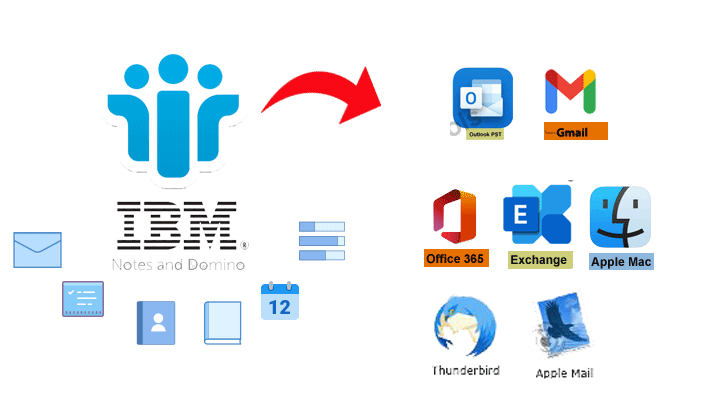
Migrate NSF files from IBM Lotus Notes/Domino Mailbox to PST, Apple for MAC, Office 365, Exchange Server, CSV for Excel, & Gmail etc
(Average Rating 4.9 Based on 1654 Reviews)

*Free Download enables you to preview the converted file and save 30 items per folder.
Trusted by



Money Back Guarantee







Awarded by

CNET Editor's Choice
"KDETOOLS, a well known name now! Company created many trusted and superiorly working tools in the field of Data Recovery, Email Migration, Cloud Computing, etc."
CNET Editor's Choice
"KDETOOLS, a well known name now! Company created many trusted and superiorly working tools in the field of Data Recovery, Email Migration, Cloud Computing, etc."

pcmag.com
"KDETools is a reputed name in the Data Recovery and File Repair tools across the world. They have been serving for more than a decade and continue to develop innovative tools to satisfy their customers' requirements."
pcmag.com
"KDETools is a reputed name in the Data Recovery and File Repair tools across the world. They have been serving for more than a decade and continue to develop innovative tools to satisfy their customers' requirements."
Testimonials

"Jsem velmi rád, že jsem zde napsal o KDETools NSF na PST Převodník, technický tým, který mi pomohl v průběhu procesu Převést Lotus Notes na Outlook byl úžasný a užitečný. Také e-maily IBM Lotus Notes pro konvertory aplikace Outlook mě překvapily. Vřele doporučujeme!"
Felix Paul, Czech
"Ich habe die manuellen Methoden zum Exportieren von NSF in PST gelesen und die Schritte in der richtigen Reihenfolge ausgeführt, aber leider werden einige Dateien beschädigt. Gott sei Dank, dass ich die Kopie der NSF-Dateien gespeichert habe. Danach wandte ich mich an KDETools Lotus Notes to Outlook, um zu erfahren, wie ich mithilfe des NSF to PST-Konverters mehrere Lotus Notes-E-Mails in Outlook 2016 konvertieren kann. Vielen Dank, Teams!."
Cristiano Pires, German
"Merci, je voudrais remercier de nouveau le convertisseur KDETools NSF to PST, qui m'a beaucoup aidé à chaque étape de la migration des comptes [50 utilisateurs] de fichiers NSF au format Outlook PST en quelques étapes simples. Merci beaucoup les gars!."
Adam Thomas, France
Outlook PST
Microsoft Outlook Data File
Office 365
Microsoft 365 (Email Web Client)
Gmail
Google Mail (Email Web Client)
Exchange Server
Live Exchange Server
EML
Single Mail Message
EMLX
Single Mail Message (Mac Mail)
MSG
Single Mail Message (Outlook)
HTML
Web File Format
MBOX
*.mbox (Collection of Email Messages)
CSV
(Comma Separated Value)
Plan Text File
VCF
vCard (Electronic Business Card)
ICS (iCal)
ICS (Store calendar information)
Portable Document Format
NSF
Lotus Notes Data File
TGZ
Zimbra Desktop Data File
IBM Lotus Notes NSF Converter – Key Features

Migrates Lotus Notes/Domino NSF to 30+ File Formats
Migrates Lotus Notes/Domino NSF to 30+ File Formats
The NSF Converter converts Lotus Notes NSF files to different file formats such as MSG, EML, EMLX, PDF, HTML, PST, and etc. The user can select the file format from the displayed options and save the files in the desired file format..
Bulk IBM Lotus Notes Mailbox Migration
Bulk Mailbox Migration from Lotus Notes to Outlook PST
The Batch NSF to PST Converter saves the time of its users by enabling them to choose NSF items in bulk by using this advanced feature. The 'Batch Conversion' feature is developed to make the conversion process quicker and simpler as the tool allows its users to choose NSF files in bulk right away and selects the multiple NSF files at once and saves the users time. The user can simply choose multiple NSF files by just selecting them in one go and the tool uploads them and starts the conversion process.
Convert IBM name.NSF files
Convert IBM name.NSF files
The IBM Lotus Notes to Outlook Converter tool provides its users with the option of converting any form of NSF files including password-protected, orphaned, damaged, encrypted, corrupt, and etc. By using the powerful utility, the user is able to retrieve data from any type of NSF file and start the conversion process in any desired file format by simply choosing the file format from the available list.
The user can rest assured as they can retrieve data from orphaned, damaged, encrypted, corrupt, and etc. NSF files by just executing a few simple steps.

Migrats IBM Lotus Notes to Office 365 directly
Migrats IBM Lotus Notes to Office 365 directly
The NSF to Office 365 converter transfers Lotus Notes NSF files to Office 365 account. The user needs to download, install and run NSF to Office 365 converter on their operating system. The user can easily migrate the NSF files to their Office 365 account by filling the right credentials
Migrate Lotus Notes to Exchange Server 2019, 2016, 2013
Migrate Lotus Notes to Exchange Server 2019, 2016, 2013
The Lotus Notes to Exchange converter enables the user to migrate their NSF files to their Live Exchange Server account. Once the user download, install and run the software, the user needs to fill the credentials of their respective accounts.

Convert Lotus Notes *NSF Emails with Attachments
Convert Lotus Notes *NSF Emails with Attachments
The users can convert NSF emails with attachments such as images, link, Inline images, PDF, documents, and etc. into the selected file format. Use the advanced Lotus Notes to Outlook Converter tool to convert NSF emails with attachments in just a few steps without damaging the mailbox items. The users can easily convert NSF emails with attachments by using the tool.
The NSF to PST Converter tool does not miss or skip even a single email attachment while converting data from NSF to PST file type.

Migrates Lotus Notes to Gmail | Gsuite directly
Migrates Lotus Notes to Gmail | Gsuite directly
Lotus Notes to Gmail Converter is a best NSF to Gmail Converter tool allow to migrates multiple NSF to Gmail, GSuite and Google Workspace. The user can easily migrate their PST mailbox items such as Folders, Tasks, Contacts, Calendars, Notes, Subfolders, etc. Without damaging the mailbox items, the users can safely execute the migration process from PST to GSuite, Gmail, Google Drive, etc..

Export NSF to MBOX [Thunderbird/Apple for Mac]
Export NSF to MBOX [Thunderbird/Apple for Mac]
The NSF to MBOX Thunderbird Converter provides an option to export NSF files to MBOX format for more than 20 + supported email client applications. The versatile utility is designed to support MBOX supported email applications such as Thunderbird, Entourage, Apple Mail, Evolution, Eudora, SeaMonkey, and etc. The software has an array of advanced features that allows its users to choose an MBOX supported email client and start the extraction of data to the desired file type.

Export Lotus Notes * NSF Contacts to vCard/CSV
Export Lotus Notes * NSF Contacts to vCard
The Lotus Notes Contacts to Outlook Converter is a powerful tool allowing the user to exports IBM Lotus Notes 'NSF Contact Folder' to the vCard file format and access the NSF Address Book and Contact details after converting the data. By running the converter on the system, the user has to select the 'NSF Contact Folder' from the list and start the conversion of data by executing a few steps. The advanced software permits the user to view NSF Contact details including name, date of birth, and etc. by launching the software. The software ensures its user to export the entire NSF Contact Folder' without compromising on the security of the data. The software exports the contact folder and displays the image of the contact details. By using the converter, the user can export the Home, Primary, and Business number to the vCard file type.
Migrates Louts Notes *NSF Calendars to vCal/ICS
Move NSF Calendars to vCal/ICS
Lotus Notes NSF Calendar to PST Migration is that it permits its users to move NSF Calendar folder to vCal file format. The user can move NSF calendar details in the vCal file type without installing Outlook on the system. The user just has to launch the NSF to PST extractor on the system and perform a successful conversion from NSF Calendar folder to vCal file type. The utility provides a safe platform to the user to move the Calendar Appointments, Attachments, Meetings, Data, and etc. The software is integrated with the latest features that allow its users to move the NSF Calendar folder without modifying even a single detail. The NSF to PST software is equipped to perform a wide range of features and the user does not need to purchase another tool to convert the NSF Calendar folder.
Generates Log Report and Analysis
Generates Log Report and Analysis
After converting NSF Lotus Notes files to Outlook PST format, the NSF Converter generates a log report consisting the entire details of the conversion. The report will indicate details such as NSF and PST Count, Duplicate Count, Folder Path, and etc. The log report and analysis will show even the minute details to the users. The log report consists of the following files:
Duplicate Count | Folder Path | PST Count | NSF Count

Maintains the HTML Formatting
Maintains the HTML Formatting
The Lotus Notes NSF to PST software maintains the HTML formatting after extracting the data from NSF to PST format. This is another major feature of the software as it preserves the original inline images and HTML formatting after converting the data from NSF to the desired file type. By running the tool and converting the data, the software will keep the images and SMTP Header intact and the users can rest assured and not worry about ruining the HTML formatting..

Generate a Free Preview of Lotus Notes Mailbox
Maintains the HTML Formatting
The Free lotus Notes NSF to PST Converter generates a free preview of NSF files by pressing on the 'Preview' option. The software permits its users to generate a free preview of the uploaded NSF files before starting the conversion process. This incredible feature allows users to check if they have selected the correct folders or not and starts the conversion process after verifying the data.
The user can use this feature for free and does not have to pay an extra charge to double-check the files before converting the data. This feature is available in the demo version of the tool as well.
Software Specifications
| System Requirement |
Processor Minimum Pentium Class |
Operating System Windows 10, 8.1, 8, 7, Vista, XP |
Memory 512 MB Minimum |
Hard Disk 50 MB of free space |
| Software Delivery |
Electronic Yes |
|||
| License & Version |
Single User License Can use only on a single system |
Technician License Can be used on '3' systems simultaneously |
Version 5.5 |
|
| Interface Available |
Language Supported English, German, French, Italian, Spanish |
|||
| Download Guides |
Installation Guide User Manual Purchase Related FAQs | |||
Frequently Asked Questions (FAQs)
Below we have mentioned the steps to convert Lotus Notes files to Outlook:
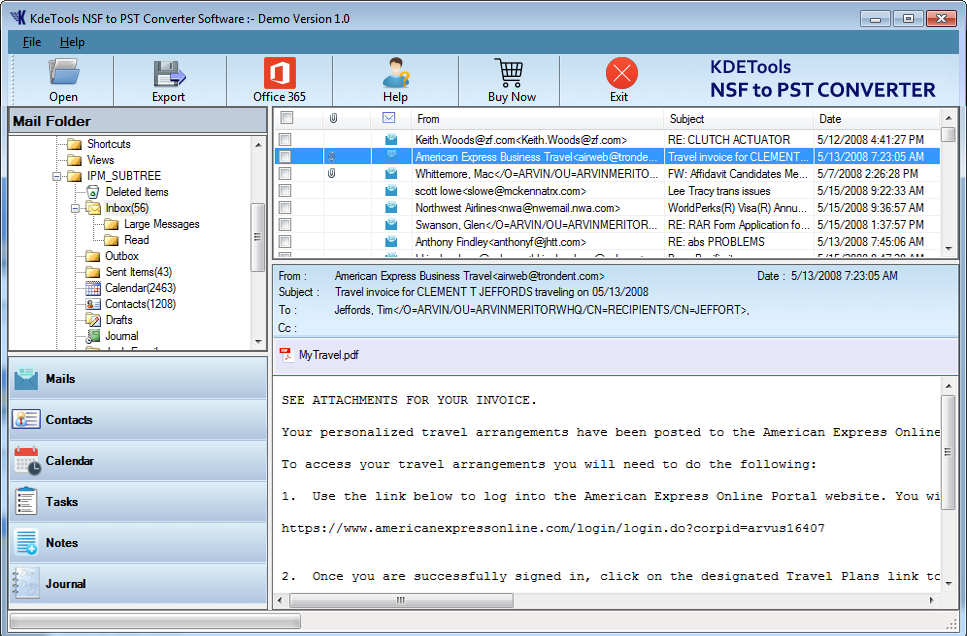
The Lotus Notes supports all the versions of IBM Notes such as 9.0, 8.0, 8.5, 7, 6, 6.5 and below versions.



D - 478, Sector - 7,
Dwarka, New Delhi - 75
India
Call Us
91-9555514144
You can also find us:



KDETools Software® is the Registered Trademark of KTools Software Pvt Ltd
© Copyright 2019-2020 www.kdetools.com. All Trademarks Acknowledged.
 USA/Canada: +1888-8444-213