 USA/Canada: +1888-6100-834
  Rest World: +91-955-5514-144
  Whatsapp: +91-955-5514-144 | PARTNERS SERVICES CONTACT US ABOUT US
USA/Canada: +1888-6100-834 Rest World: +91-955-5514-144 Whatsapp: +91-955-5514-144 | PARTNERS SERVICES CONTACT US ABOUT US
Whatsapp: +91-955-5514-144 | PARTNERS SERVICES CONTACT US ABOUT US
USA/Canada: +1888-6100-834 Rest World: +91-955-5514-144 Whatsapp: +91-955-5514-144 | PARTNERS SERVICES CONTACT US ABOUT US
KDETools Top Blogs
We are sorry for the inconvenience, Solve Quickly!
It is undoubtedly true that there is nothing more beneficial and effective than Microsoft® Outlook emailing application. It is highly used all over the world for fulfilling emailing operations. In fact, Outlook provides immense of the components such as contacts, calendars, tasks, to do list, etc. Everything remains fine with Outlook but at times users face error messages and there feel the ultra need for some help. Sometimes Outlook cause issues and this is confirmed via error message. Suppose you use Outlook and all of a sudden error appears ‘Microsoft Outlook has encountered a problem and needs to close.
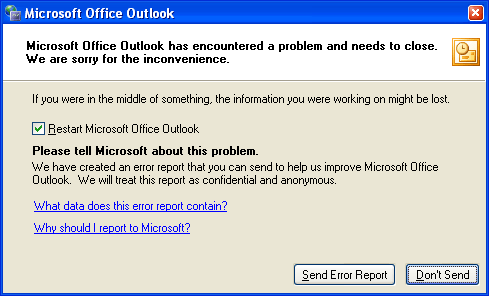
We are sorry for the inconvenience.’ This error will keep up pop up on screen until and unless get solved..
Why Error pop Up?The unexpected error message reported because of several reasons such as PST file corruption, bugs in entire Outlook Program, inadequate system resources, defective errors, virus attacks and so on.
Some other vital causes behind error are:
Fix the error message: In order to fix error, you may try out following methods:
Try to open MS Outlook in safe mode and consider removing inapt plug-in. For opening Outlook in safe mode, use the below mentioned command: outlook /safe and then press Enter
Search for ‘Norton’ or AVG plug in, Check whether they are installed or not. If they are installed then disable them quickly. Restart Outlook normally and this will remove the above given error. In most of the cases, “Norton” antivirus plug-in may cause Outlook error
Ensure for deleting undue emails as well as email attachments
Try out repairing PST file via scanpst.exe or PST Repair tool
If these solutions work then it is fine otherwise go for professional software application. There are immense of the tools available for rectifying error ‘Microsoft Outlook has encountered a problem and needs to close. We are sorry for the inconvenience’
Install Third-party tool for solving error: :

You may consider for KDETools for Outlook PST Converter application anytime you want. It is a professional application that aims at sorting out immense of the PST files at a time. This application is full of technicalities but at the same complex-free to work with. If you wanted to know everything about tool in advance then download the tool in free of cost trial edition.
This will remove all sorts of tribulations you might be facing when it is to use software. Install the software in fully licensed mode and seek the successful results soon.
For more information: https://www.kdetools.com/pst-converter.htmlRecent Posts



D - 478, Sector - 7,
Dwarka, New Delhi - 75
India
Call Us
91-9555514144
You can also find us:



KDETools Software® is the Registered Trademark of KTools Software Pvt Ltd
© Copyright 2019 www.kdetools.com. All Trademarks Acknowledged.
