OST to PST Converter Tool

(4.8/5 Rating based on 28652 Reviews)

One of the best ways to export OST emails to PST is by using an OST to PST converter tool. It converts OST mailbox data into PST format for import into Microsoft Outlook. KDETools' OST email converter also offers 30+ export options for OST data.

Bulk OST file conversion into PST format with real hierarchy
Export easily large size OST email data into PST file.
OST email converter tool keep intact OST emails and folders structure.
Export emails, contacts, drafts, attachments to PST email file format.
OST to PST converter is capable to maintain email meta-data and properties
Converts OST files and import into Microsoft 365 and Exchange Server
Quick conversion of OST emails into PST for Outlook with data originality.
Convert OST archive of Outlook 2024, 2021, 2019, 2016, 2013 and earlier
Software has recently converted a 215/GB of largest OST file successfully.

Download the free trial version and migrate 30 items per folder.

Windows User
Mac User
650k+
Windows User
165k+
macOS User
PST
MSG
EML
PDF
HTML
vCard
Office 365
Exchange
Gmail
Workspace
MBOX
ICS
CSV
O OST
Save OST to 30+ Formats & Cloud Servers
OUR PRESTIGIOUS CLIENTS
🔴 COMCAST
DC.gov
State Bank
POLICIA FEDERAL
CANADAHITECH
hp
orange™
PDB
MANTL

Outlook OST Email Data Preservation

Emails
Attachments
Date/Time
Calendar
Contacts
HTML Body
From / To / CC / BCC
Local Folders
Folder Structure
Metadata

Powerful Features of OST to PST Converter

Mapping Mailbox for Google Workspace

Easy Mapping can be done for OST email file to its designated Google Workspace account. One can start process of mailbox mapping, by choosing designated users, get particular required mailbox and also select multiple users selection via CSV file. Add the entry into a CSV file of all users. Feature support with - M:1, 1:M 1:1, and M:M mapping mailbox.

Default Mailboxes Mapping

Enable Mapped with Default Mailboxes to automatically match standard folders, including Inbox, Sent Items, Drafts, and Deleted Items, with their corresponding folders in the destination. In Google Workspace, the mappings are Inbox → Inbox, Sent Items → Sent Items, Drafts → Drafts, and Deleted Items → Deleted Items; in Google Workspace, Deleted Items → Trash. Click on enable Hierarchy to maintain the original folder and sub-folder structure throughout the migration.

Do Mailbox Mapping for Office 365

Assign each OST file to its target Office 365 mailbox account. Mailbox mapping lets users choose destination accounts, selection options for particular mailbox only, and you can also setup multiple users via a CSV file format in which you can add users details. Mapping supports - 1:1, 1:M, M:1 and M:M.

Same Mailbox Mapping for Microsoft Office 365

When migrating to Office 365, Mapped with Default Mailboxes automatically assigns standard folders to their matching locations: Inbox → Inbox, Sent Items → Sent Items, Drafts → Drafts, and Deleted Items → Deleted Items. To keep the mailbox organised as it was originally, enable Follow Tree Hierarchy to maintain the existing folder and subfolder structure during migration.

Screenshots | Step-by-Step Guide

Check How OST Converter Tool Works!

Explore these steps and screenshot for clear example on how to convert OST to PST.

STEP 1 OF 8
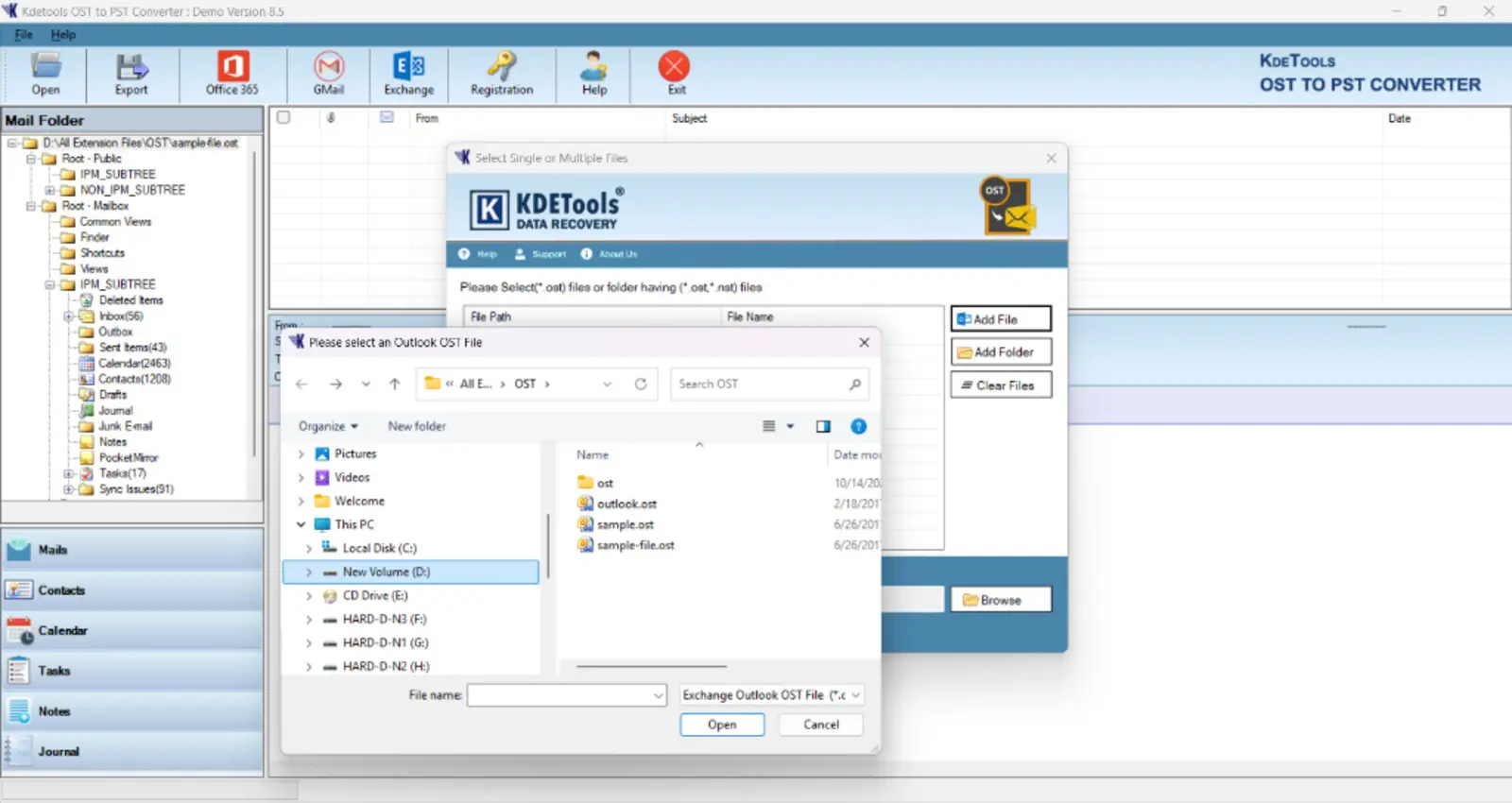
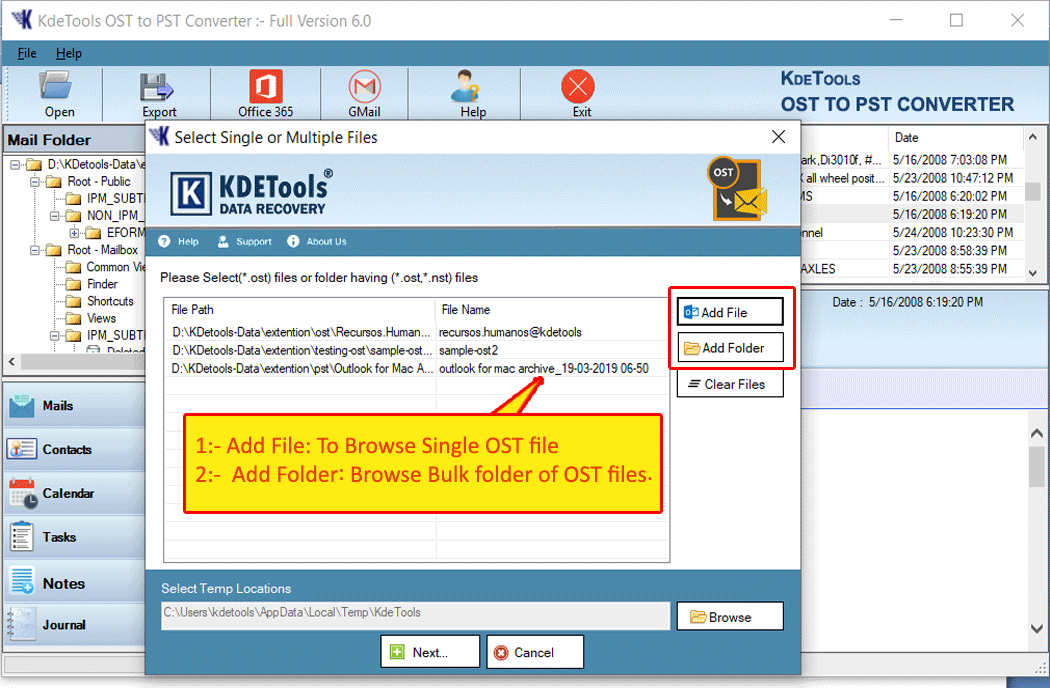
Step 1: Browse and add an OST file in KDETools OST to PST Converter
KDETools OST File Converter's Screenshot
STEP 1 · ADD YOUR FILE

Load an OST File or Folder

Choose to Add File or Add Folder to load OST emails.

OST to PST Converter - Advance Features

Download and install The Software to Verify The Stated Features During Conversion

Search OST File Option on PC/Laptop

This amazing feature enables users to efficiently import bulk OST files to convert into PST format. In the software panel, there is the facility of the “Search File” option that is succeeded by “Search Selected Drive” and “Search All Drive.”.

By using the “Search Selected Drive,” you can find the OST files from various drives including C, D, and E. By selecting the "Search All Drive," you can find the OST files from all available drives in just a single click.

Depending on the level of corruption of OST files, you can select any desired scanning mode including Quick and Advanced. Quick Scan mode is applicable for the OST files with minor corruption levels. And you can select advanced Scan mode to convert heavily corrupted OST 2 PST format.

KDETools OST to PST Converter screenshot: Add File Option - Search File
KDETools OST to PST Converter screenshot: Export Option - Advance Settings

Convert OST to PST With Advance Options

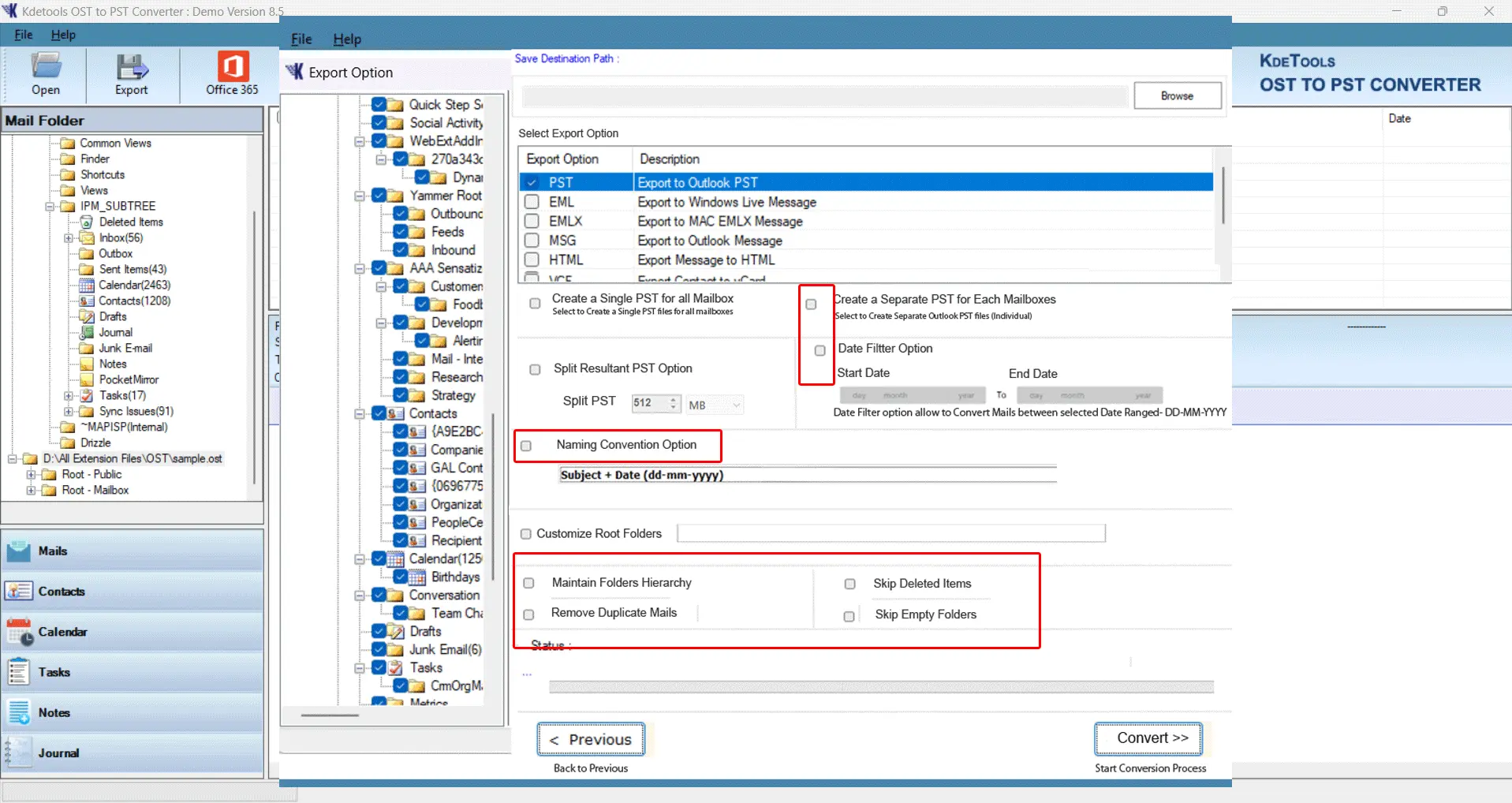
During the conversion of OST to PST file, many advanced export options get generated by the utility. The options are:

  • Folder Structure Option: Maintaining the folder structure of the resulting PST file in the same manner as that in the source format. The user can choose this option in order to maintain the folder structure or the user can un-select/uncheck this option in order to get the flat hierarchy.
  • Exclude Empty Folders: Using KDETools OST to PST tool, the users have the choice to ignore empty folders from being included in the resulting PST file.
  • Use Outlook: For increasing the speed of the conversion process, the installation of MS Outlook is mandatory on the machine.
  • Ignore System Folders: By choosing this option, the user can exclude the system folders from being converted into PST file.

When to Use KDETools OST to PST Converter?

Microsoft Outlook classic offers an in-built export feature for archive that lets users to store OST file of Exchange SErver and IMAP server into PST format. However, it has some limitations. Here's why:

  • IMAP Server Not Present
  • Server Down or Exchange User Deleted
  • Working with Another User’s OST File
  • Convert OST to PST without Outlook
  • Migrate OST Data to Another Email Platform
  • Restore Inaccessible/Corrupted and Offline OST
  • Convert Orphaned OST Files and Other Users’ OST Data
KDETools OST to PST Converter screenshot: Select Export Type

Benefits of KDETools OST Converter Tool

Explore these key features of KDETools OST to PST converter program, including preview, batch conversion, and email filtering. Also supporting file systems of Microsoft Outlook email archives like, MSG, OFT, NST, PST, OST file systesm and how export features works.

Bulk Conversion of OST Email Files

Using this powerful Outlook OST to PST converter tool, users can easily export multiple OST files to PST format. Exported PST files are supported by all Microsoft Outlook versions and even works well with Microsoft 365 cloud account. Single OST file conversion feature is also present and when multiple OST files are required to be converted into PST format then bulk conversion of OST file to PST is useful. Exporting bulk OST emails into PST format makes it easier to manage emails and folders in a one place centralized way.

  • Add File - This option is for single OST file conversion.
  • Add Folder - This option is useful for bulk OST file conversion.

Preview and Sort Emails in Tool

By simply importing the OST file into the OST to PST conversion tool, user can sort the emails with the help of various sorting options. Some of the sorting options which you will get in the program include:

  • Filter - From, Subject, To, sent date & time
  • Filter - Received date & time, email size

Just click on any of these options, and all OST emails will be sorted accordingly.

Export OST Emails with Attachments

In case you want to export the emails which have attachments, then this OST to PST converter tool is the best one for you. All you need to do is to click on the attachment button available in the preview window and all emails with attachments will be sorted. KDETools OST to PST converter is also known as an OST file converter, OST email converter, or OST exporter tool. These terms refer to software designed to convert or export OST files using a software/program designed for Windows OS.

Erase Encryption - S/MIME & OpenPGP

Decrypt Emails option available in the OST email exporter console makes it easy for users to decrypt and remove S/MIME (Secured Multi-purpose Internet Mail Extension) & OpenPGP (Pretty Good Privacy) encryption on OST File emails. After the OST to PST conversion process is completed, users will be able to get output PST file which won't be encrypted and hence can be opened without certificates & private keys password. Get the license version of OST file converter and easily handle encrypted OST files.

Keep Intact Metadata Post-Conversion

With the help of this converter tool for ost, one can easily convert all emails with attachments present in offline OST data files into PST format. It retains all the metadata of all items same as the original one such as To, Cc, Subject, Size, etc. Entire properties of emails would be resulting same into PST format and you get an authentic result.

Advanced Filters Makes Conversion Best

Outlook OST to PST converter uses some of the most powerful filters to make it easier for converting OST files to PST. Some of the filters available are the “Split PST file into smaller parts”. In addition to that, you can use the feature known as “Date Filter” where you can simply convert required only OST email data using the dates provided. Using the feature called “Naming-Convention”, you can convert OST files into PST format with date+year+subject+name+email as per requirements.

No Recurring - One-Time License Pay

The software is sold one-time payment and you can use it until it is licensed to use or as per validity. There are no hidden costs or annual subscriptions in KDETools OST to PST converter. Moreover, you can use the software as many times as possible and export OST files into PST email file format. Exported PST file can be import on MS-Outlook client and access emails and properties.

Advanced OST File Conversion Options

Using various advanced filters to change OST to PST, there are some advanced features that are also used, such as: “Keep Original Structure” where the originality of the PST file generated as an output file will remain as it is according to its source file. “Do Not Export Empty Folder”, as a result all the empty folders will not be exported during conversion. “Ignore System Folders”, as a result the system folders will be ignored during the conversion process.

Supports All Microsoft Outlook 2024 & Below

This tool of OST to PST conversion supports Latest Microsoft Outlook versions. After the successful loading of .ost file in OST email converter, users can export OST to PST for Microsoft classic Outlook 2024, 2021, 2019, 2016, 2013, 2010, 2007, 2003. So get the latest version free license and OST a PST converter software.

Export OST Calendars to vCal Individually

OST converter tool enable users to convert multiple OST calendar items to vCal format only [Calendar]. Using this Outlook OST email converter, uses also can export only calendars to vCal file with authenticity. When no emails are required and no other email items are required to convert and only OST email calendars are required to export into vCal, then this OST to PST exporter tool is helplful.

Larger Size OST File Export

KDETools has conducted a thorough examination of its OST to PST conversion tool in dealing with large OST files in a more efficient manner. This program allows converting large OST files to PST files when there is an issue with the Exchange Server like crashing, unavailability, or outlook synchronization problem. OST email converter enables users to convert OST mailbox to PST and extracting the data in 99.9% accuracy.

Extracts Entire OST File Items

Entire elements and properties of OST file, such as emails, attachments, contacts, calendar, tasks, notes, and journals, are extracted by this program. OST to PST conversion tool conducts the perfect email conversion while maintaining the integrity of the mailbox items. It is the best choice for all cases where users require moving their OST files to PST format and conversion of OST to PST without an Exchange profile.

Exports OST Email Data to Office 365

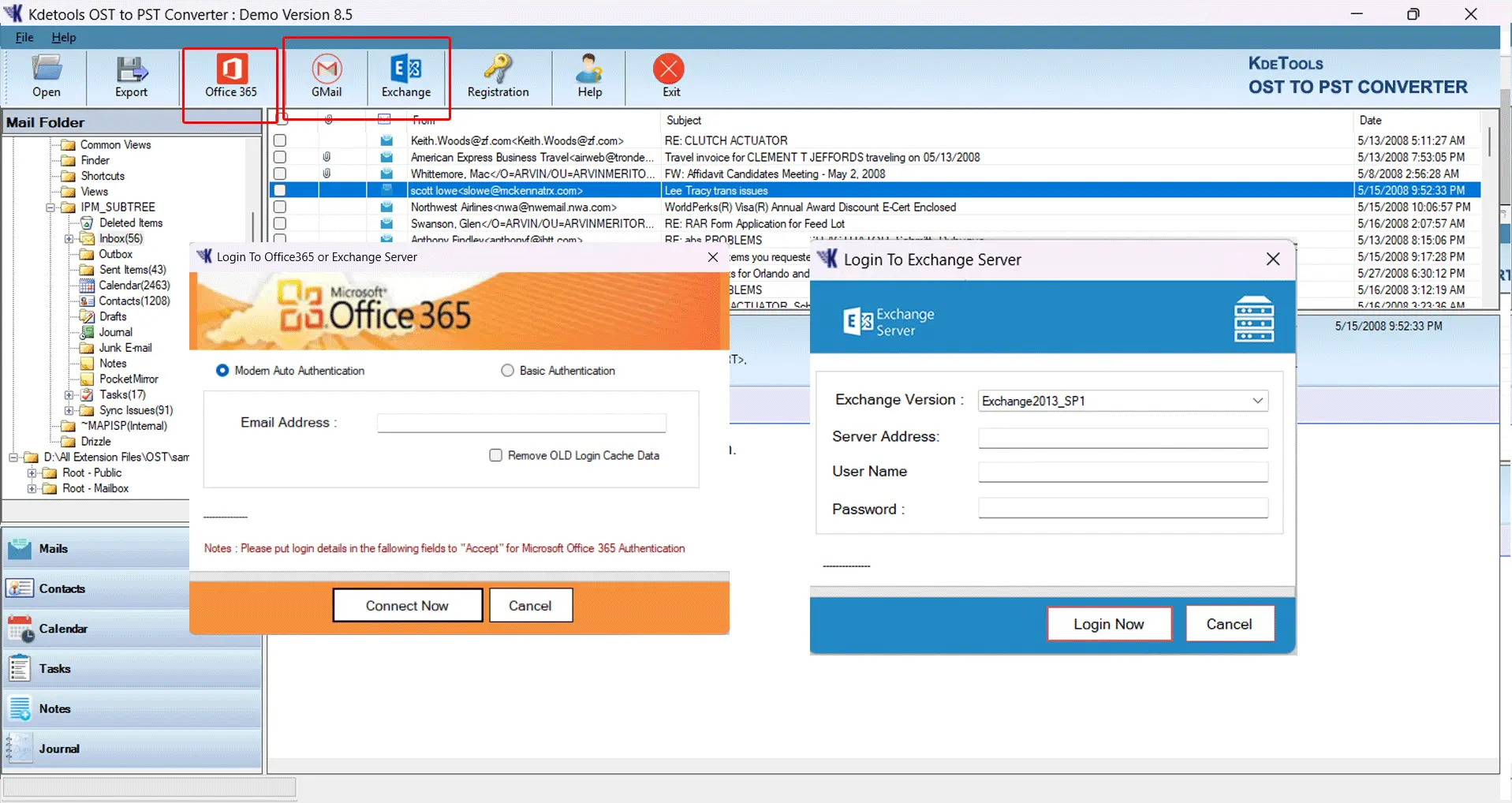
Conversion of the mailbox can be exported directly to Office 365. Users just have to choose Microsoft 365 profile option from the Saving list and convert their mailboxes straight from there. OST to O365 export is an option is only available with corporate license version, enterprise license version and site licene version of OST to PST.

Convert OST File in 10+ Document Formats

This program is designed specially for all types of users' requirements like conversion of OST emails, migration of emails, changing OST emails to PST format and to cloud based mail accounts. KDETools OST to PST converter tool provides users with options to export mailbox data in different file formats like PST, MSG, EML, RTF, HTML and PDF. As well as more benefits, users can view data of OST file using applications like Outlook, web browsers, PDF viewer and text readers.

All Windows OS Supported

This program is smartly designed to work on all Microsoft Windows operating system PC and Laptop. It provides multiple functionalities so that the users can easily complete all their requirements in a single place.

Remove Duplicate OST Emails

KDETools OST converter makes it possible for users to remove duplicate emails when converting OST emails to PST format. Unwanted emails removal, folder removal, and other useful filter options makes it more convenient to manage emails into resultant PST format.


Customer perspectives

Experiences That Shape a Better Conversion Workflow

Explore these positive reviews from our recent customers with their feedback on KDETools OST file covnerter tool. They successfully migrated and exported orphaned OST files.

diana max review for kdetools ost converter

Diana Max

Exchange Server Admin

Verified Buyer

“At the time of conversion I needed only selected email folders from multiple users profile, I used this OST file converter and found it effective in conversion matching my requirements. I was able to select email folders from multiple users profile of our organization. I successfully achived the result. Thanks for the real-time support service on time.”

john hamprey review for ost file conversion

John Hamprey

Global Administrator Microsoft 365

Verified Buyer

“I had to transfer OST files of six user profiles into Microsoft 365. All these OST files consisted of email content of large volume. There was not even one OST file which was below 7 GB in size. What I was interested in was that emails and folder structure remained intact in the original form.
I used KDETools OST Email Exporter for this job and it did all the work automatically. In about six hours, all the OST files belonging to six users got transferred into Microsoft 365 while emails and folder structure remained as it was.”

Conversion guidance
Verified Professionals Recent Verified Buyers & Professionals — Their Real experiences with OST-to-PST conversion, mailbox migration and services they received.

Frequently Asked Questions

Where to get the Free OST to PST converter tool

There is no completely free OST to PST converter tool or program available. Only free trial and demo versions are available. You can try KDETools' converter for OST files.

  • 1st step: Download, install, and run the OST converter.
  • 2nd step: Click on Add file for single OST file conversion.
  • 3rd step: Click on Add Folder for multiple OST file conversion.
  • 4th step: Open the OST file and view the available folders and email preview.
  • 5th step: Select the email folders you want to export into PST format.
  • 6th step: Click on Export and select the PST File option.
  • 7th step: The software will start converting OST emails into PST format.
  • 8th step: After conversion, import the resulting PST file into Outlook.

My OST file is corrupt, can I export corrupt OST to PST?

Yes, the software is designed to open readable corrupt OST files and provides an option to convert recoverable data into PST format.

Does the KDETools OST to PST converter support large big size OST files?

The software is designed to process OST files of different sizes. Actual processing depends on the file condition and available system resources.

I want to export only specific OST emails into PST format, is it possible?

Yes, you can select specific emails and folders from an OST file and export only the required items into PST format.

I cant open corrupt OST file, how to open it?

If you are unable to open an OST file because it is corrupt, a repair process may be required. KDETools OST recovery software can attempt to repair the file and save recoverable data in PST format. Recovery results depend on the extent of the damage.

What is the scope of moving OST file to a new PC?

Answer: To move an OST file to a new computer, you may need to convert the recoverable OST data to PST format first. The resulting PST file can then be transferred to the new computer and opened or imported in Outlook.

How can I open or access archive OST file on a new Windows OS?

Answer: An OST file is an offline Outlook data file associated with its original mailbox. If that mailbox is no longer available, access may depend on the condition of the OST file. Converting recoverable data to PST format can allow it to be opened or imported in Outlook.

Is there way to convert OST to PST for Outlook 2019 without Exchange account?

Answer: An OST file may be convertible without access to the original Exchange account, depending on the file's condition and the converter's compatibility. The resulting PST can then be imported into a supported Outlook version.

Can I restore back my OST file on Exchange Server?

Answer: An OST file is an offline Outlook data file, rather than a file stored directly on the Exchange server. To import recoverable data into a mailbox, you can convert it to PST format and then use a supported Outlook or Exchange import workflow.

  • Select the destination mailbox and choose the PST import option.
  • Use the import wizard to specify the PST file location and click Next.
  • Select the user mailbox into which the PST data should be imported.
  • Choose the notification option if required, then complete the wizard.
  • Verify the imported folders and messages in the destination mailbox.

News & Updates

fix outlook error 0x8004010F

Fix Outlook Error 0x8004010F

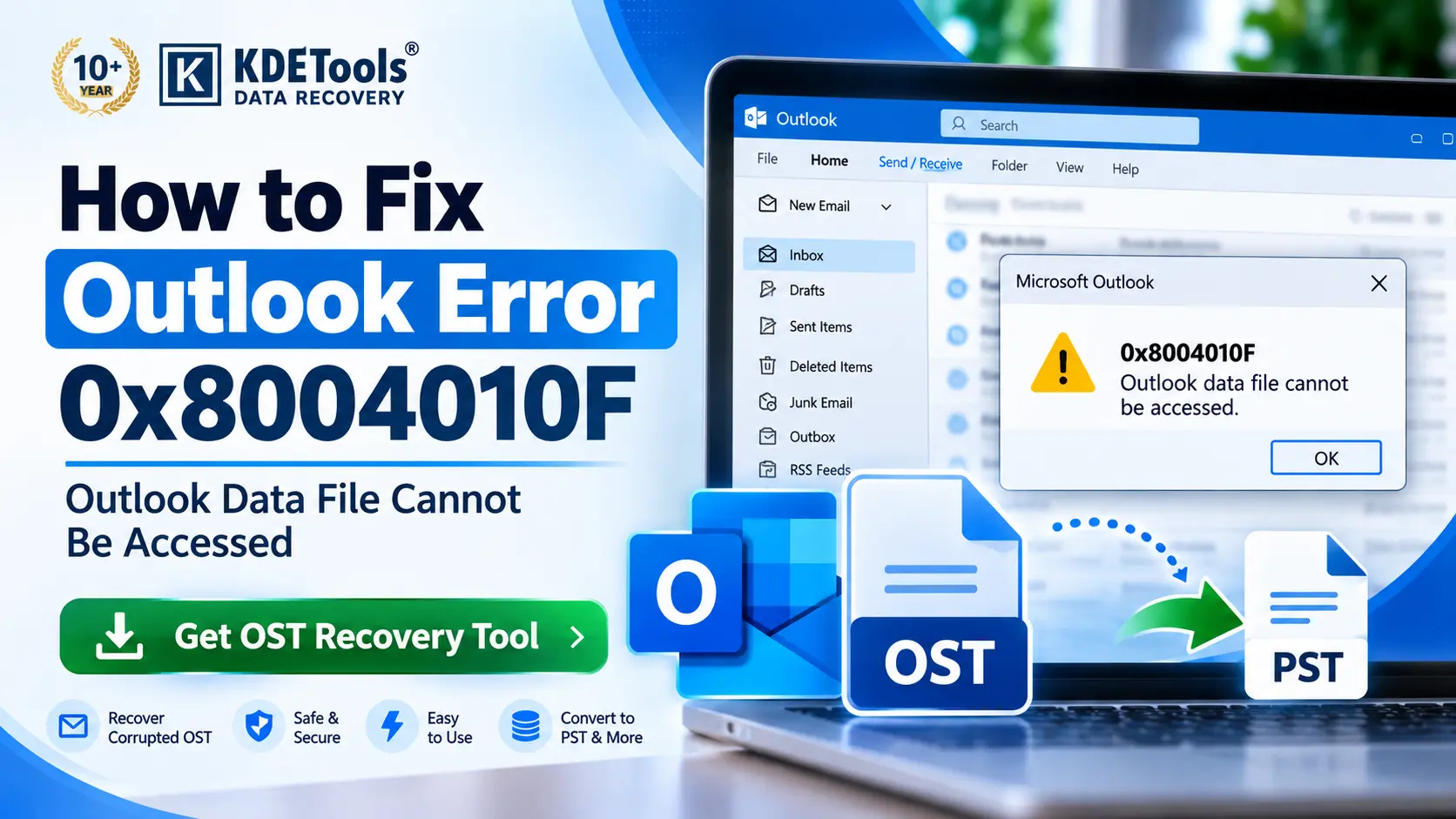
Check the solution to fix 0x8004010F: Outlook data file cannot be accessed.

Read More →
zimbra to 0365 migration

Solution to Get Zimbra Mail in Office 365

One of the best ways to get Zimbra emails to Office 365 account is to use these proven methods described in article.

Read More →
Fix Outlook error 0x8004010F

Microsoft Outlook Not Responding | Solved!

Read about common causes of Microsoft Outlook Not Responding and discover effective solutions to fix the issue.

Read More →
EXPERTISE & GUIDES

Latest News & Articles

Blogs

How to Fix OST File It Cannot Be Accessed

The following are the various disadvantages of OST files since they may be corrupt, damaged, and show errors in their working while using Outlook. In case of receiving a popup window that displays "OST File is in Use and cannot be accessed," then do not worry since we have suggested a professional fix for this issue. Also, we have given the causes of this problem in our blog.

Read More...

Knowledge Base

OST File Cannot Be Opened Error in Outlook

In such situations, things go wrong to the extent that OST File Cannot Be Opened Outlook. In such a situation, Outlook users suffer badly, and they try to seek some quick help. But just trying to take a conclusion will do no good at all; therefore, you should be aware of the reasons behind such an error so that next time if you come across any error.

Read More...

How to

Outlook Data file cannot be accessed (Error 0x8004010F)

Sometimes the user encounters an error and is unable to access their files. There could be a number of reasons for the occurrence of such an error. But in case of receiving a pop-up message like "0x8004010F: Outlook data file cannot be accessed." Don't panic, as there is a way out for this problem.

Read More...

50+ Solutions | Served 950k+ Customers Worldwide!

Products